How to set up asset tags: numbering, placement and material
An audit sample is where asset tags prove their worth: peeling, faded, or carrying a number that no longer matches anything. Numbering, content, material and placement, from practice.
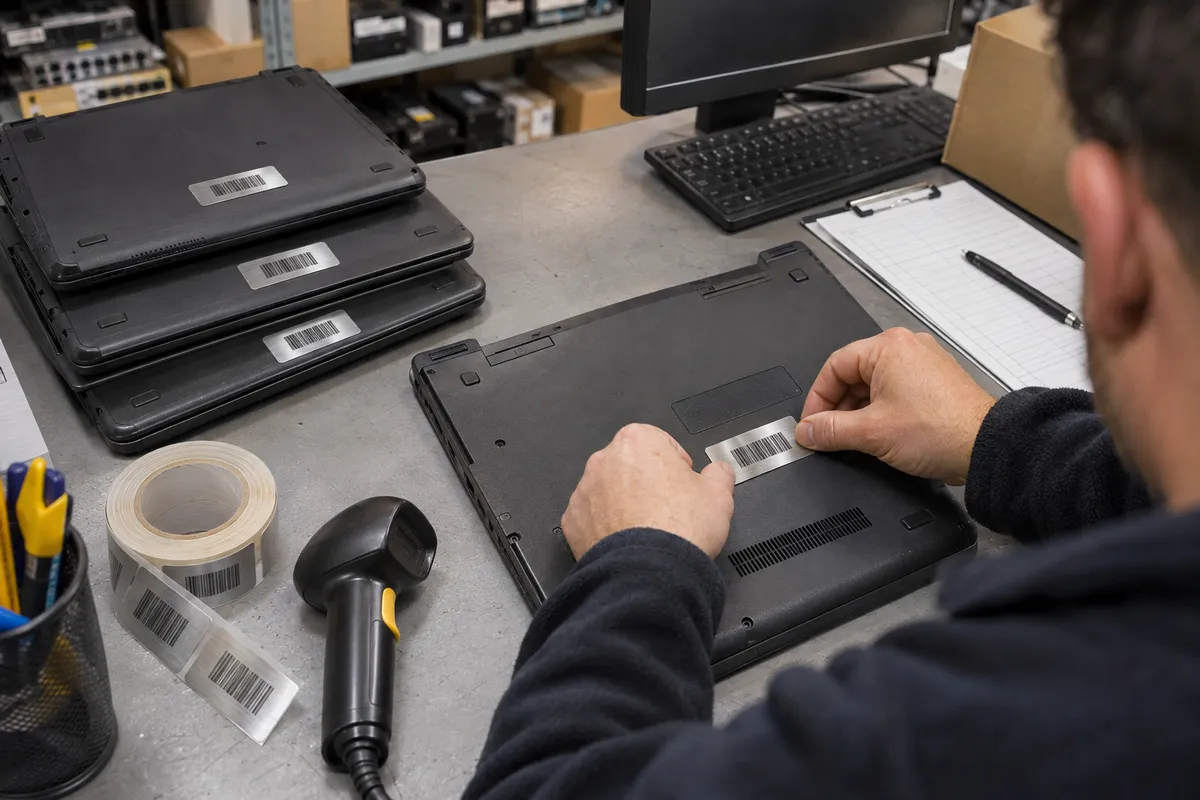
The auditor picks twenty lines from the fixed asset register and asks to see them. The first laptop's tag is hanging by one corner. On the pillar drill the number has faded to a ghost. The monitor on line three has moved desks and nobody can say which one it is. The tag is rarely the real problem. It just exposes a numbering scheme, material and position that were never decided.
What the rules require, and what they don't
UK company law requires adequate accounting records, and auditors will test the existence of fixed assets, but nothing requires a physical tag. The tag is simply the only practical way to prove that 2,000 items on a spreadsheet exist, without someone recognising each one by sight.
IT teams have a second reason: ISO/IEC 27001:2022, control 5.9, calls for an inventory of information and other associated assets. An unlabelled laptop can't be tied to a user, or reliably wiped when it comes back.
So an asset tag has one job: link a physical object to exactly one line in the asset register. Everything else follows from that.
The number is the decision that matters
The classic mistake is a "meaningful" number: HQ-IT-2026-014. The day the machine moves to the Leeds site, the tag is wrong. Asset numbers that last are dumb:
- fixed length with leading zeros:
004217, never4217on one item and04217on another; - at most a short, permanent prefix per company if several group companies share one system, but no site or cost centre;
- no look-alike characters: O and 0, I and 1, S and 5;
- never reissued: a number that left with a scrapped item stays retired.
Site, department, user and purchase date belong in the software, not on the tag.
Companies with a GS1 Company Prefix can use the GIAI (Global Individual Asset Identifier): the prefix plus an individual asset reference, alphanumeric, up to 30 characters, encoded behind Application Identifier (8004). GS1 states that a GIAI which stays with the asset must never be reused. It earns its keep when assets pass through service contractors or customers who already read GS1; for purely internal use, your own number range is enough. Returnable items that travel between companies, such as pallets, crates and kegs, use the GRAI instead.
What goes on the tag
- The number in plain text, large: that is what gets read when the scanner fails.
- A barcode of that same number, nothing else.
- The company name or logo, with wording like "Property of…".
- Optionally, a phone number or address for returning found items.
On the symbology: a linear Code 128 reads on any handheld scanner, including the laser units still common in warehouses. A Data Matrix fits in a few millimetres and copes with curved surfaces, but needs an imager or a phone. A QR code carrying a URL lets staff report a fault by scanning the kit; the URL then has to keep working for as long as the asset exists. Whatever you choose, keep a clear quiet zone around the code. Minimum sizes are covered in how small can a barcode be.
Which material for which asset
| Asset | Material | Why |
|---|---|---|
| IT, office furniture | matt silver PP (Silvermat), thermal transfer with a resin ribbon | looks like a plate, resists rubbing and normal cleaning products |
| Desirable loan kit, power tools | VOID security label | leaves a visible pattern if peeled off |
| Machines on the shop floor, oils, solvents | polyester or PP, resin ribbon, tested with the actual fluid | paper breaks down |
| One-off stocktake campaign | paper | acceptable only for a short time |
Direct thermal paper is the wrong choice for fixed assets: it yellows with heat and light, and the barcode stops scanning long before the asset is written down. The difference between the two processes is explained in direct thermal or thermal transfer.
One detail people miss: on gloss silver, reflections blind some scanners. The matt finish is not a cosmetic choice.
Where the tag goes
The rule that saves the most time: one fixed position per asset type, written down. With 2,000 assets, the seconds spent hunting for the tag decide how long the audit takes.
- Laptops: on the base next to the manufacturer's plate without covering it; never on a removable panel or over vents.
- Monitors: on the back, top corner, reachable without removing the stand.
- Desks, cabinets: on a visible edge or side panel, not under the top where someone has to lie on the floor to scan it.
- Machines: at operator height near the rating plate, never on a removable guard. See also our rating plate guide.
Before applying: degrease with isopropyl alcohol, let it dry, press firmly over the whole label. Textured powder coatings and low-energy plastics such as polyethylene and polypropylene hold standard adhesive poorly; tell your supplier.
Worked example: 2,400 assets across three sites
A manufacturer records 900 IT items, 1,100 pieces of furniture and 400 machines and tools:
- dumb numbers
000001to003000: 2,400 assets plus roughly 25 % in reserve for new purchases and replacements; - tag 50 × 25 mm in Silvermat, logo and "Property of…" pre-printed, number and Code 128 sequentially numbered by the supplier;
- 300 VOID labels in the same size for laptops and cordless tools;
- a small thermal transfer printer for reprints.
A lost tag is reprinted with the same number, only after checking the register. Tags spoiled during application are destroyed and logged as spoiled, so no number turns up later on a different item.
Mistakes we see again and again
- A number that encodes the site or department.
- Pre-numbered rolls with no log of used and spoiled numbers: duplicates are guaranteed.
- Tag on the box, the bag or the charger instead of the asset.
- Barcode with no human-readable number.
- Office-grade material stuck on shop-floor equipment.
What to tell your label supplier
| Point | Example |
|---|---|
| Size and quantity | 50 × 25 mm, 3,000 labels |
| Material | Silvermat, polyester, VOID |
| Number range | 000001 to 003000, plus any prefix |
| Code | Code 128, Data Matrix or QR (with URL) |
| Fixed print | logo, "Property of…", colour |
| Surfaces | painted metal, textured plastic, wood |
| Finishing | roll, core, winding direction, printer model |
Our Silvermat labels come blank or printed, and VOID security labels suit the most exposed kit. Sequentially numbered tags are ordered as printed roll labels.
This article reflects the rules cited as of its date; always check the current text and your accountant's or auditor's requirements.
FAQ
Is asset tagging a legal requirement?
Not as such. Companies must keep adequate accounting records and auditors test that fixed assets exist, but no rule requires a physical tag. In practice, tags are how you prove existence at scale.
What information should an asset tag show?
The asset number in plain text, the same number as a barcode and the company name. Site, department and purchase date stay in the software, because they change.
Barcode or QR code on asset tags?
Code 128 reads on every handheld scanner. Data Matrix and QR suit small surfaces and phones; a QR code with a URL also lets staff report faults.
Where should an asset tag go on a laptop?
On the base next to the manufacturer's plate, without covering it, and never on a removable panel or vent. Use the same position on every laptop.
Can asset numbers be reused?
Better not: a number that left with a disposed asset stays retired. For the GIAI, GS1 forbids reuse outright.